
Appius
Products
  • Appius-PLM Technical Document management
    • Electronic archive, project structure tree
    • Importing documentation from the registry
    • Importing documentation from the invoice
    • The responsibility matrix
    • Invoices
    • Letters
    • The review process
    • The approval process
    • Technical requests for changes
    • Project management
    • Reports
    • Integration with AutoCAD
    • Integration with configurations on the 1C platform
    • Integration with Autodesk Revit
    • Integration with Oracle Primavera
    • More
  • Appius-PLM Product Lifecycle Management
  • Engineering databases
Services
  • Technical support
  • Methodological support
  • Training
News
Company
  • About the company
  • Product Benefits
  • Documents company
  • Requisites company
Contacts
    +7 (495) 740-60-03
    +7 (495) 740-60-03
    +7 (925) 359-60-03
    Email
    stdo@appius.ru
    The address
    Moscow, st. Mitinskaya 16
    Working hours
    Mon. – Fri .: from 9:00 to 18:00
    en
    ru
    en
    Appius
    Products
    • Appius-PLM Technical Document management
      • Electronic archive, project structure tree
      • Importing documentation from the registry
      • Importing documentation from the invoice
      • The responsibility matrix
      • Invoices
      • Letters
      • The review process
      • The approval process
      • Technical requests for changes
      • Project management
      • Reports
      • Integration with AutoCAD
      • Integration with configurations on the 1C platform
      • Integration with Autodesk Revit
      • Integration with Oracle Primavera
      • More
    • Appius-PLM Product Lifecycle Management
    • Engineering databases
    Services
    • Technical support
    • Methodological support
    • Training
    News
    Company
    • About the company
    • Product Benefits
    • Documents company
    • Requisites company
    Contacts
      +7 (495) 740-60-03
      +7 (925) 359-60-03
      Email
      stdo@appius.ru
      The address
      Moscow, st. Mitinskaya 16
      Working hours
      Mon. – Fri .: from 9:00 to 18:00
      Appius
      Telephones
      +7 (495) 740-60-03
      +7 (925) 359-60-03
      Email
      stdo@appius.ru
      The address
      Moscow, st. Mitinskaya 16
      Working hours
      Mon. – Fri .: from 9:00 to 18:00
      Appius
      • Products
        • Products
        • Appius-PLM Technical Document management
          • Appius-PLM Technical Document management
          • Electronic archive, project structure tree
          • Importing documentation from the registry
          • Importing documentation from the invoice
          • The responsibility matrix
          • Invoices
          • Letters
          • The review process
          • The approval process
          • Technical requests for changes
          • Project management
          • Reports
          • Integration with AutoCAD
          • Integration with configurations on the 1C platform
          • Integration with Autodesk Revit
          • Integration with Oracle Primavera
        • Appius-PLM Product Lifecycle Management
        • Engineering databases
      • Services
        • Services
        • Technical support
        • Methodological support
        • Training
      • News
      • Company
        • Company
        • About the company
        • Product Benefits
        • Documents company
        • Requisites company
      • Contacts
      • en
        • Language
        • en
        • ru
      • +7 (495) 740-60-03
        • Telephones
        • +7 (495) 740-60-03
        • +7 (925) 359-60-03
      • Moscow, st. Mitinskaya 16
      • stdo@appius.ru
      • Mon. – Fri .: from 9:00 to 18:00
      Home
      Products
      APPIUS Technical document management
      Electronic archive, project structure tree

      Electronic archive, project structure tree

      Electronic document archive, project structure management, associative link between documents, documentation status management, work with files of any format, fast data loading, customizable access rights and multi-criteria search.

      The transformation of documents from hard copies into electronic files and, as a result, the organization of an electronic documentation archive create conditions for the greatest efficiency of any company, increase the efficiency of employee interaction, reduce enterprise costs and increase the security of documents. Maintaining an electronic archive guarantees the orderly storage of office files in a single information space of the organization, improves the collaboration of specialists, ensures proper tracking of documentation revisions and compliance with regulatory requirements.

      Project Tree

      The main interface of the electronic archive in the system is the project tree. It focuses on managing the project structure, the life cycle of documents and their changes, generating reports, etc. In the form of tabs, information related to the current element is displayed: properties, access rights, applicability, files, transmittals, tasks, business processes, and etc.
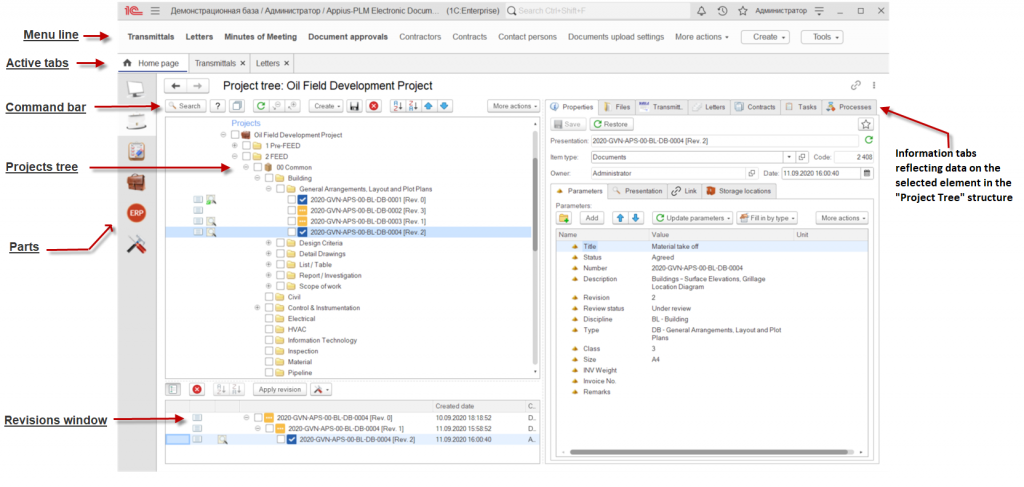
      Project_tree_final_v.png

      Project tree

      The project tree is a universal tool for navigating through the data in the system and works with all data structures, organizing their viewing in a convenient representation in the form of a hierarchy.

      The basis of the organization of an electronic archive is an electronic document, which always belongs to a certain type. The view determines the meaning of its content and requisite part. The content part of the electronic document is made up of files, and the requisite part is the document parameters. The main types of elements responsible for the functions of an electronic document include:

      • document (sheet);
      • set of documents;
      • normative document;
      • estimate document;
      • as-built document.


      The accounting unit in the system is a set of documents that can be detailed sheet by sheet, and each document can be accompanied by several files of any format (for example, pdf and native format). This structure makes it easy to organize an electronic archive of project, design, estimate, detailed design, as-built, permitting documentation as well as detailed design documentation for equipment.

      The system has the function of downloading files to disk both for a separate document and for selected sets/objects/projects. In this case, it is possible to create a folder structure, add files to the archive and specify an access password.
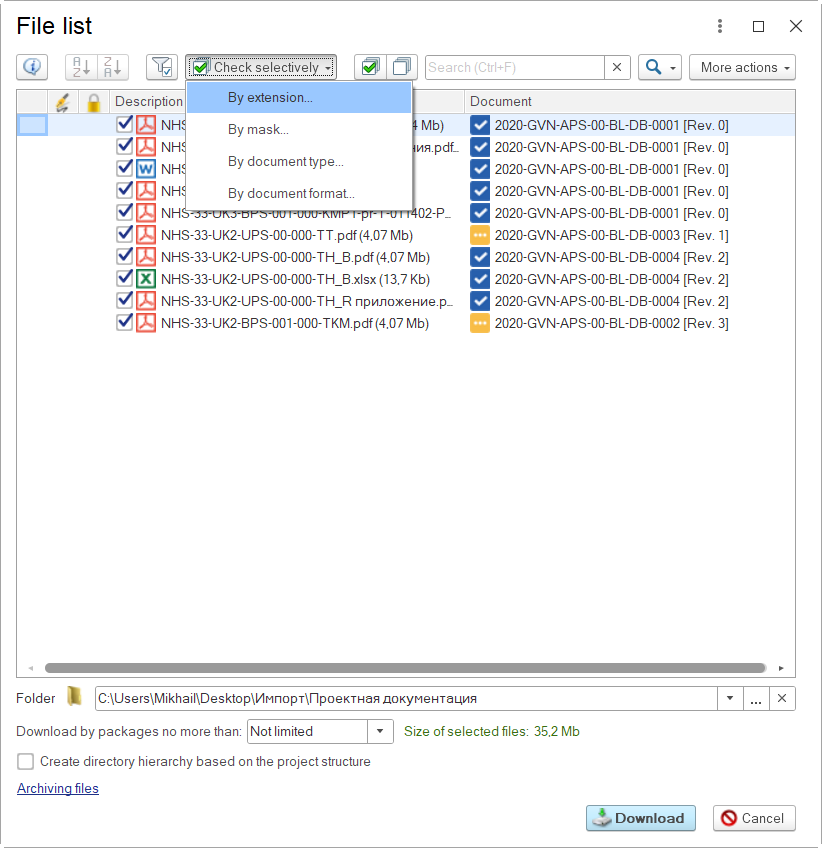
      Files_downloading.png 

      Files downloading


      Access rights

      For collective work of several users in the system, differentiation of access to information is used. Access rights are combined, on the one hand, from user roles, and on the other hand, by an internal system for access rights differentiation. For each element of the system, object and group policies are set.
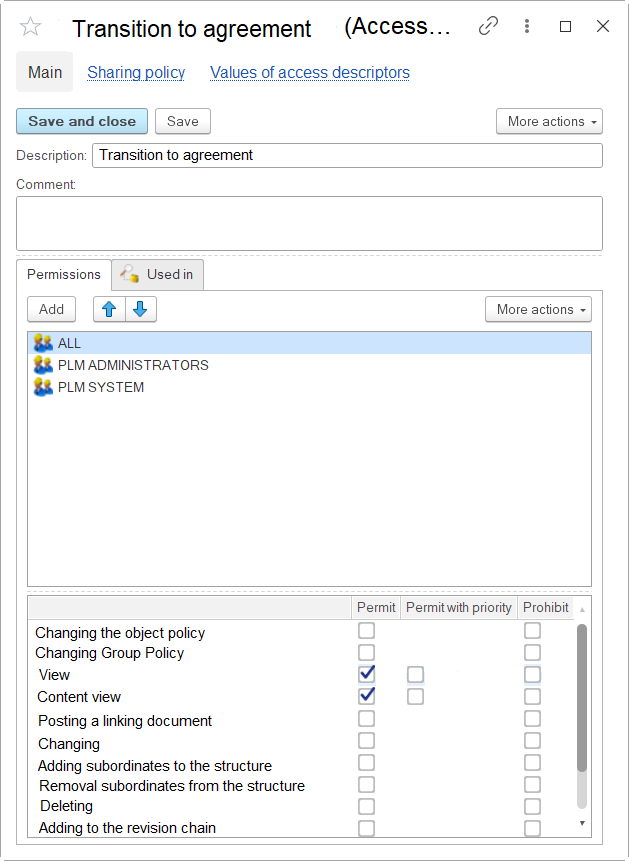
      Access_rights.png

      Access rights


      An object policy is assigned to an element when it is created and can be inherited from the element's parent to its descendants. Group policy on elements and their settings is assigned automatically by means of the approval business process.


      Search


      The system implements a quick search for information using a multi-criteria filter:

      • search with the ability to specify a mask (part of the name or designation of the element);
      • search locations (specific projects, folders, etc.);
      • type of element (for example, a set of documents, a sheet, an estimate, etc.);
      • date/period of creation, receipt and transfer to the contractor;
      • parameters (status, review status, document type, etc.).

      The search mechanism in the system makes it possible to search for documents of different formats in the database by the text content of attached files (pdf, odt, doc, etc.). You can find any file in the system, knowing, for example, a word, phrase, designation or other textual content of the document inside.

      The tool provides a quick search for documents through preliminary indexing (extraction of textual information from them). Indexing of documents occurs automatically using a background job - the system indexes the contents of new documents added to the system on a schedule.
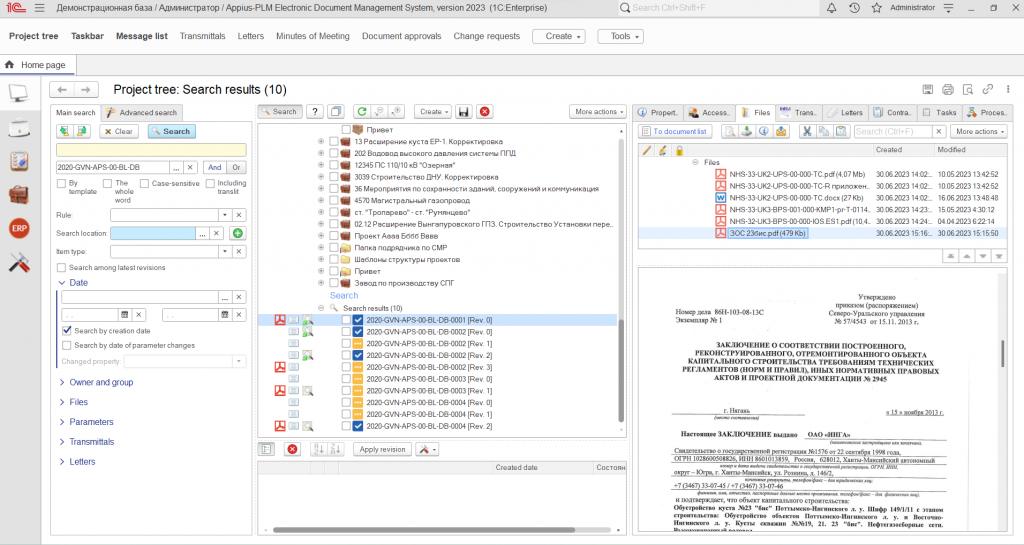

      Searching.png

      Searching


      Structure Management


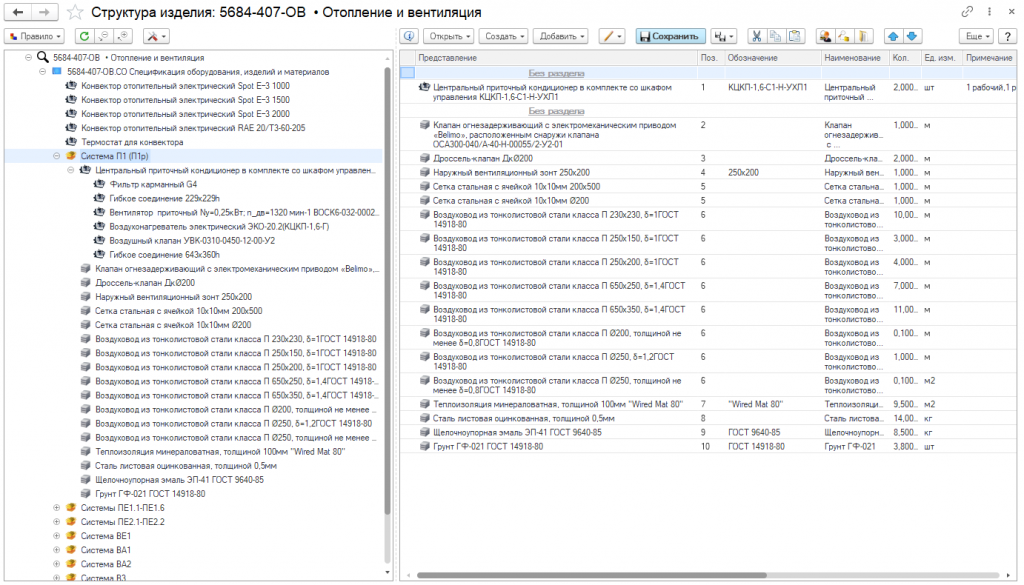
      The system allows you to generate a work scope list (WSL) and an equipment and material specification (EMS). The elements of these documents are: equipment, materials, standard and other products, works. For the convenience of working with a restrictive list, a special engineering reference guide has been created, the elements of which are associated with the nomenclature reference guide. The direct formation of the composition of the WSL and the specification takes place in the structure control window.

      upstr.png

      Product structure management


      Company
      About the company
      Product Benefits
      Documents company
      Requisites company
      Products
      Appius-PLM Technical Document management
      Appius-PLM Product Lifecycle Management
      Engineering databases
      Services
      Technical support
      Methodological support
      Training
      News
      Contacts
      +7 (495) 740-60-03
      +7 (495) 740-60-03
      +7 (925) 359-60-03
      Email
      stdo@appius.ru
      The address
      Moscow, st. Mitinskaya 16
      Working hours
      Mon. – Fri .: from 9:00 to 18:00
      stdo@appius.ru
      Moscow, st. Mitinskaya 16
      stay in touch
      © 2026 APPIUS
      Personal Data Processing Policy